AI integration
AI integration services: add AI to the systems you already use
Most businesses do not need a new platform. They need a language model wired carefully into the one they have, with a plan for the day the model is slow, wrong or switched off.
Projects from $1,500$30 an hourFixed quote after a short call
350+ businesses served since 2018 · Based in Pune, India



Recent work

Free quote · reply in one working day
Get your AI project done properly, at a price agreed up front.
Request received
Thanks. It is with our team.
We will reply within one working day with questions or a fixed quote for your AI project. If it is urgent, email rohit@liftup.tech or WhatsApp +91 77689 10234.
350+businesses served
8countries
7+years















In short
AI integration connects a language model or other AI service to software you already run, such as a CRM, helpdesk, store, ERP or internal tool, through APIs. The work covers authentication, data preparation, prompts, error handling, fallbacks, cost limits and logging, so the AI feature behaves like any other dependable part of your product.
On this page 6 sections
Four ways AI plugs into existing software
The right pattern depends on how fast the answer is needed and what happens if it is wrong.
| Pattern | How it works | Example | Watch out for |
|---|---|---|---|
| Inline call | User waits while the model answers | Suggest a reply inside the helpdesk | Slow responses, timeouts |
| Background job | Model runs after an event, result saved later | Summarize every new support ticket | Failed jobs nobody sees |
| Scheduled batch | Model processes a pile at night | Tag last month's product reviews | Cost spikes, partial runs |
| Human in the loop | Model drafts, a person approves, system saves | Draft quote emails | Approval queue backs up |
We pick the pattern with you after looking at the workflow. If the job involves several systems and decisions, it may be better as an AI agent; for fixed flows, AI automation is simpler.
What can fail, and what we build in
An AI call is a dependency that is slower, less predictable and more expensive than a database query. We treat it that way.
- Provider outage or rate limit: retry with delay, then switch to a second model or show a plain fallback.
- Slow answers: timeouts, streaming where useful, and a visible waiting state.
- Wrong or unsafe output: schema checks on structured output, content rules, and a person for risky actions.
- Runaway cost: per-user and per-day caps, with an alert before the cap is hit.
- Model retirement: a thin adapter so replacing a model is a configuration change plus a test run.
- Leaked data: only the fields needed are sent, personal data is removed where possible, keys are kept in a secrets manager.
Estimate usage before you commit
Model providers charge by the amount of text they read and write. A short calculation shows the order of magnitude before you build. Take a feature that summarizes support tickets.
| Input | Example |
|---|---|
| Tickets per day | 400 |
| Text read per ticket, including instructions | 1,500 tokens |
| Summary written | 150 tokens |
| Daily tokens | 400 x (1,500 + 150) = 660,000 |
| Monthly tokens | 660,000 x 30 = 19.8 million |
Multiply the monthly figures by your provider's current rate for input and output. Rates change often, so we check them at quote time and again at launch. This method also shows where trimming the prompt saves most. Our OpenAI API integration and Claude API integration pages cover provider specifics.
Want AI integration done for you?A short call, a written plan and a fixed quote.
Get my free quoteOur process
- Map the touchpointWhere in the workflow the AI appears, who sees the result, what data it needs and what it may change.
- Check accessAPI documentation, authentication, rate limits and sandbox availability for each system involved.
- Prototype on the real flowA thin version running against test data in your environment, scored on a set of real cases.
- Build the safety layerFallbacks, caps, logging and schema checks as listed above.
- Release behind a switchA feature flag lets you enable it for a few users, then everyone, and turn it off in seconds.
- DocumentArchitecture note, data flow diagram, runbook and test script.
What you get and how long it takes
- A working AI feature inside your existing software, behind a feature flag.
- Code in your repository or ours, following your review process.
- Logs of every model call with cost, timing and outcome.
- A data flow note you can pass to your security or privacy reviewer, covering what leaves your systems under GDPR, UK GDPR, CCPA or Australian Privacy Act rules as they apply to you.
A single integration into a system with a decent API can be ready for a pilot within a few weeks. Older systems without a clean API, or several connected tools, take longer. Your quote names the stages and the dates for your scope; ask for it on the contact page. For the underlying idea, see what is API integration.
How we report and related work
While we build, you receive a short weekly note. After release, a monthly note lists calls made, error rate, average response time and spend against cap, all from the logs we set up.
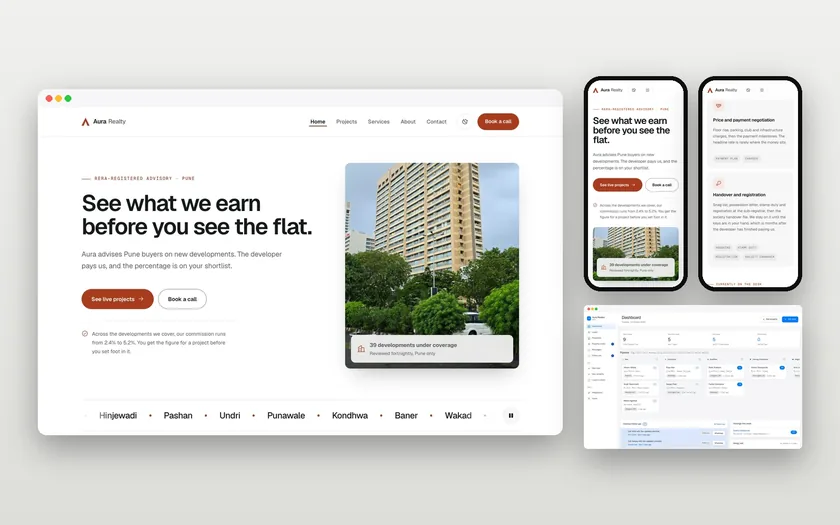
We have not published an AI integration case study. Our closest real work is integration without AI: Aura Realty, where a custom CRM was built to collect enquiries from the website, Instagram, WhatsApp and calls, and We Make In India, a React Native and Node.js app. Both involved connecting systems and handing over something a client could run.
Updated 20 November 2026

Questions, answered
Something else on your mind? Ask us directly or WhatsApp us. We reply within one working day.
Can you integrate with a custom or older system?
Do we have to send customer data to an AI provider?
What if the provider changes its pricing or model?
Can we turn the feature off quickly?
Do you work with our in-house developers?
Keep exploring
OpenAI API integration
Calling the API takes an afternoon. Making it reliable, affordable and safe inside a real product is the actual job, and that is the part we do.
PlatformClaude API integration
Claude is Anthropic's model family, available through its own API and through cloud platforms. We wire it into your software: the prompts, the tool…
Pricing guideHow much does AI integration cost in 2026?
Adding AI to software you already run is mostly an integration job. The model is the easy part. The price lives in your systems, their APIs and your…
Tell us which system needs the AI
Name the software and the task on the contact page, and we will reply with the pattern we would use.