Shopify SEO
Shopify SEO services for stores on any theme
Shopify handles a lot of SEO basics for you, and creates a few problems of its own. We find which ones apply to your store and fix them in order.
Projects from $1,500$30 an hourFixed quote after a short call
350+ businesses served since 2018 · Based in Pune, India



Recent work
Free quote · reply in one working day
Want us to build your Shopify store? Get a fixed quote in one working day.
Request received
Thanks. It is with our team.
We will reply within one working day with questions or a fixed quote for your Shopify store. If it is urgent, email rohit@liftup.tech or WhatsApp +91 77689 10234.
350+businesses served
8countries
7+years















In short
Shopify SEO is the work of making a Shopify store easy for Google and AI tools to crawl, understand and rank. Liftup Technologies fixes technical issues first, such as duplicate product URLs, collection pages, theme speed and redirects, then improves product and category copy, and reports from your Search Console.
On this page 6 sections
What Shopify gives you, and what it does not
Out of the box, Shopify produces an XML sitemap, clean HTTPS, mobile-ready themes and editable page titles. A new store is not starting from zero. What it lacks is judgment: the platform will happily publish ten thin collection pages, two URLs for every product and a theme loaded with scripts from apps you stopped using.
Shopify also fixes the URL pattern. Products sit under /products/, collections under /collections/, pages under /pages/ and posts under /blogs/. You cannot remove those prefixes, so SEO on Shopify is about working inside that structure and choosing names, handles and internal links with care.
Common Shopify problems we look for
| Issue | Why it happens | What we do |
|---|---|---|
| Two URLs per product | A product is reachable at /products/name and at /collections/x/products/name | Check the canonical tag points to the short URL and that internal links use it |
| Thin tag and filter pages | Collection filtering and tags create many near-identical pages | Keep useful ones indexable, noindex or canonicalize the rest |
| Variant confusion | Every size and color has its own URL parameter | Confirm one canonical per product and variant data in schema |
| Slow theme | Old apps leave code behind after being uninstalled | Remove dead scripts, compress images, defer what can wait |
| Redirect gaps | Deleted or renamed products return 404 | Add redirects in the admin, mapped to the closest live page |
| Weak category copy | Collections have a title and a grid, nothing else | Write a short intro above the grid and a buying guide below |
Shopify lets you edit the robots.txt file through a Liquid template, so we can block problem paths when needed. We make that change carefully and test it, because a mistake there can hide an entire store.
Who this is for
- Stores that launched with a template and have never had a technical review.
- Brands about to migrate to Shopify who need a redirect plan, see Shopify SEO migration.
- Stores with a large catalog where Search Console shows many pages as 'Crawled, currently not indexed'.
- Owners relying on paid ads who want a second traffic source that does not stop when the budget does.
- Merchants who sell to the US, UK, Australia or EU and need correct currency, tax and hreflang handling.
If your store has fewer than twenty products and sells mostly through social media, content and links will usually move you more than technical work. We will say that after looking at your data.
Want Shopify SEO done for you?A short call, a written plan and a fixed quote.
Get my free quoteHow the work runs
- Store reviewWe connect to Search Console, crawl the store and list every page type with its indexing state.
- Theme and app reviewWe profile the live theme on a phone connection, list every app and the code it adds, and mark what to remove.
- Technical fixesCanonicals, redirects, robots rules, sitemap check, image sizes, lazy loading and structured data for products, reviews and breadcrumbs. Changes go through a duplicated theme first, then live.
- Collection and product copyWe write intros and buying guides for your main collections and rework product titles and descriptions where buyers search by feature, not brand.
- Content and linksGuides that answer pre-purchase questions, then links from relevant sites and publications. See ecommerce SEO for the broader program.
- Monthly checkWe compare impressions, clicks and indexed pages with the month before and decide what to do next.
Related work on Shopify
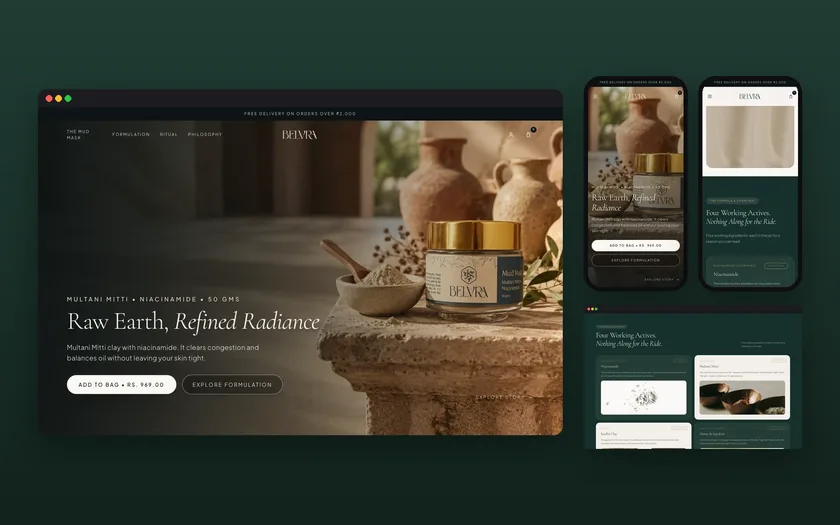
Liftup built the Shopify store for Belvra, a single-product skincare brand, where the page structure had to explain the formula and the weekly routine before asking for a sale. That project is a design and build, not an SEO engagement, but it shows the shape of a Shopify store we like to optimize: clear page purposes and few apps.
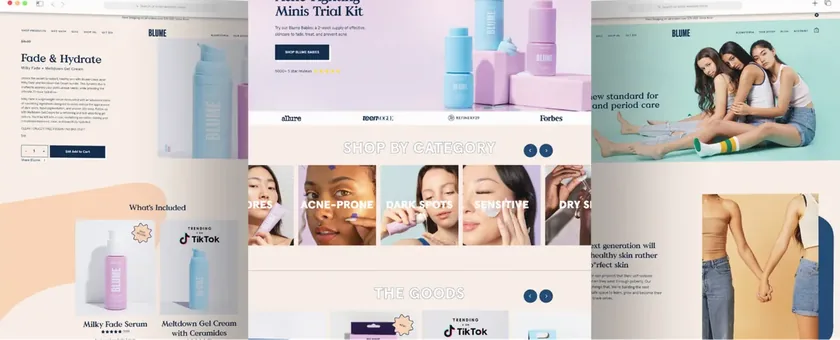
For Blume, a USA skincare brand, we worked on the ecommerce experience on Shopify. The published case study reports a 35 percent rise in conversion rate and a 50 percent rise in site traffic across the engagement. Those numbers come from the full project, which covered more than search, so we do not credit them to SEO alone.
Timeline, reporting and cost
Most stores see the technical fixes shipped within four to six weeks, with copy and content following over the next two to three months. Ranking changes take longer than that and depend on competition, so we agree checkpoints rather than a date.
Reporting comes from your own Google Search Console: indexed pages, clicks, impressions and the top queries for each collection. We also track a handful of revenue-linked pages, so you can see whether search traffic reaches the products you care about.
Market data from the Ahrefs pricing survey shows that agencies charge an average of $3,209 a month for SEO, with $501 to $1,000 the most common band. We quote your store separately: a fixed quote after a short call, because catalog size and the state of the theme change the work. Ask for a proposal. For market prices and what to ask, see the ecommerce SEO software quote and pricing guide.
Sources: Ahrefs SEO pricing survey (market data).
Updated 20 November 2026

Questions, answered
Something else on your mind? Ask us directly or WhatsApp us. We reply within one working day.
Is Shopify bad for SEO?
Will changing my theme hurt my rankings?
Can you work with my existing developer?
How much does Shopify SEO cost?
What should I prepare before Shopify SEO starts?
How do I fix duplicate product URLs on Shopify?
Shopify SEO by country
- Shopify SEO in the US
- Shopify SEO in the UK
- Shopify SEO in Australia
- Shopify SEO in Ireland
- Shopify SEO in Sweden
- Shopify SEO in Denmark
- Shopify SEO in Canada
- Shopify SEO in New Zealand
- Shopify SEO in Germany
- Shopify SEO in France
- Shopify SEO in the Netherlands
- Shopify SEO in Spain
- Shopify SEO in Italy
- Shopify SEO in Norway
- Shopify SEO in Switzerland
- Shopify SEO in Belgium
- Shopify SEO in Austria
- Shopify SEO in Poland
- Shopify SEO in Japan
- Shopify SEO in Singapore
- Shopify SEO in the UAE
Keep exploring
Ecommerce SEO services that fix the store, then grow it
Online stores create thousands of near-duplicate URLs. We decide which ones deserve to rank, clean up the rest and build collection and product pages…
PlatformShopify SEO migration: moving a store without losing search traffic
Moving to Shopify changes your URLs, your templates and your plumbing. Search traffic survives when every old address has a mapped new one and the…
ChecklistShopify launch checklist: what to do before and after you go live
Most stores that stumble on launch day did not have a design problem. They had a tax setting, a shipping zone or a tracking tag nobody tested. This…
Get your Shopify store reviewed
Share your store address and we will tell you what is blocking it after a short call.