HubSpot CMS development
HubSpot CMS development: custom themes your marketers can use
HubSpot CMS Hub makes sense when your website needs to share data with your CRM. A good build gives marketers flexible modules and keeps developers out of routine edits.
3 min read · By the Liftup team in Pune



350+businesses served
8countries
7+years















In short
In short: HubSpot CMS development means building a custom theme with reusable modules and templates in HubL, tying forms and content to CRM records, and giving marketers drag-and-drop control within guardrails. It fits teams already using HubSpot. It is less suited to complex web apps or to teams that do not use the CRM.
Rather have it done for you? See our AI automation service, from $1,500.
On this page 6 sections
When HubSpot CMS is the right base
The main reason to pick HubSpot CMS Hub is that the website sits inside the same system as marketing email, forms, lists and the CRM. A visitor fills in a form, a contact record is created, the sales team sees the page history, and a workflow sends a follow-up. You get that without connecting several tools.
The reasons to pick something else are just as clear. If you have no HubSpot subscription and no plan for one, you would be buying a platform for its CRM ties and not using them. If you need a custom application, a high-volume catalog or unusual server logic, a framework build such as headless Next.js is a better home. For a plain brochure site, WordPress is often cheaper to run.
For search work on an existing HubSpot site, see our companion page on HubSpot SEO.
What gets built
| Component | What it is | Why it matters |
|---|---|---|
| Theme | Global styles, fields, header, footer, settings | One place to change colors, fonts and layout across the site |
| Page templates | Layouts for home, service, landing, blog and legal pages | Editors build pages without breaking the design |
| Custom modules | Reusable blocks with their own editable fields | Pricing tables, testimonial rows, comparison grids |
| Flexible areas | Drag-and-drop sections within a template | Marketers rearrange sections inside defined limits |
| HubDB tables | Spreadsheet-like data that can drive pages | Directories, location lists, resource libraries |
| Forms and CRM mapping | Fields linked to contact properties | Leads arrive correctly tagged |
| Serverless functions | Small custom backend endpoints | Calculators or lookups that a template cannot do |
Free · no obligation
Get a free SEO and AI visibility check of your site
We look at how Google and AI tools like ChatGPT see your site and send you the top fixes, within one working day.
Request received
Thanks. Your free check is in the queue.
We will send the top fixes on WhatsApp or email within one working day.
How a build runs
- Audit the CRM and contentWe review contact properties, lifecycle stages, forms in use and the pages you have, so the site model fits how the team already works.
- Design in componentsThe design is drawn as a set of modules with editable fields, not as a stack of one-off pages.
- Develop locallyCode lives in a repository and is uploaded with HubSpot's command-line tools, so changes are reviewed and can be rolled back. We work in a test account first.
- Build templates and modulesEach module gets sensible defaults, help text for editors and limits that prevent off-brand choices.
- Connect forms, workflows and analyticsForms write to the right properties, and thank-you pages and tracking are tested end to end.
- Migrate content and redirectsExisting pages are moved with a redirect map, following our website migration checklist.
- Train and hand overA walkthrough for editors, plus a short written guide for the modules we built.
Gotchas we plan around
- Features differ by CMS Hub tier. Confirm which features you need before design is finished.
- HubL is a templating language specific to HubSpot. Developers new to it make avoidable mistakes with loops and filters.
- Too many fields in a module overwhelm editors. We design for the ten most common edits.
- Third-party scripts added by marketers can undo the performance work. Agree who adds what.
- Blog and landing page domains need to be set deliberately for SEO.
- Content staging and rollback options are narrower than in a Git-based workflow.
- Language variants and memberships have their own setup steps and should be scoped early.
Plan details change over time. We check the current tier limits against your needs while scoping.
Performance and SEO inside the build
A custom theme should load only what it uses. We write modules so styles and scripts load per module, optimize images, set lazy loading and test the main templates against Core Web Vitals. Titles, canonicals, structured data and breadcrumbs go into the templates once, instead of being added page by page.
Timeline and related work
| Project | Typical time |
|---|---|
| Theme with core templates and a dozen modules | 5 to 8 weeks |
| Add HubDB-driven directory or library | 1 to 3 weeks |
| Migration of an existing site | Add 2 to 4 weeks |
| Handover and training | A few days |
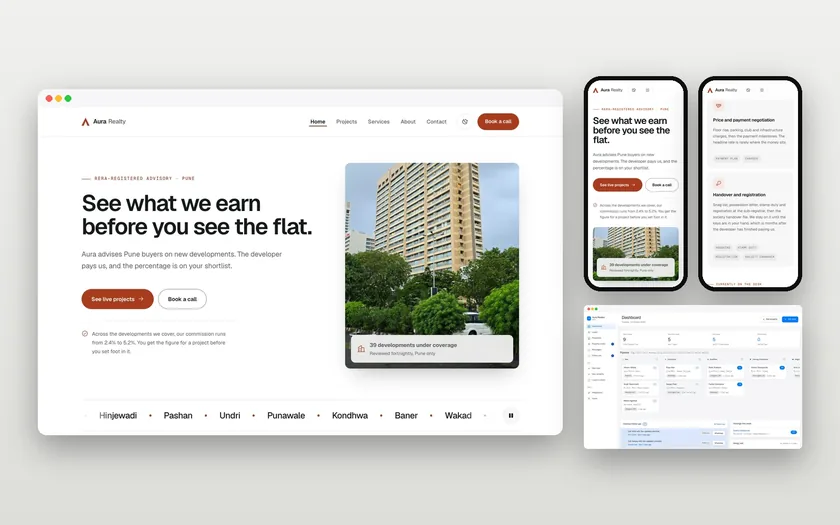
We have not published a HubSpot CMS case study. For other projects where the site had to do work for the business, see Aura Realty, where we built a website and a custom CRM, and Interakt, where landing pages were delivered in two weeks. Neither ran on HubSpot. For a fixed quote after a short call, use the contact page.
Updated 20 November 2026
Questions, answered
Something else on your mind? Ask us directly or WhatsApp us. We reply within one working day.
Do I need a HubSpot CRM to use HubSpot CMS?
Can marketers edit pages without a developer?
Can you migrate our WordPress site to HubSpot?
What is HubL?
Is HubSpot CMS good for large sites?
Keep exploring
HubSpot SEO: the settings and traps on a HubSpot-hosted site
HubSpot handles many technical basics for you. The problems we find are usually in how it is configured: domains, blog structure, redirects and heavy…
ServiceWeb development company for businesses that need the site to earn its keep
We build websites that load quickly, can be found in search and turn visits into enquiries or orders. Our head office is in Pune, India, and most…
ComparisonHeadless vs traditional CMS: the real difference
A traditional CMS manages content and builds the pages. A headless CMS manages content only and hands it to a separate front end. That split is…
See your new homepage before you commit.
A free, private homepage concept built from your own words and photos within 48 hours.